
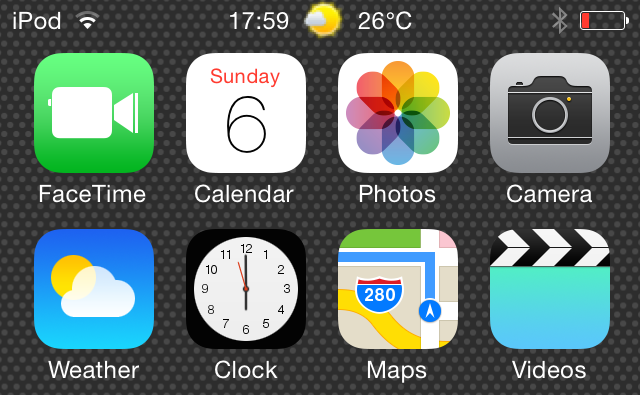
StatusbarWeather7 is a jailbreak tweak that places current weather information in the status bar at the top of the iOS interface. StatusbarWeather7 plays nice with iOS 7.1.x devices, which were just recently jailbroken courtesy of the Pangu jailbreak.
If you’re in need of a tweak that places current weather info right at your fingertips, then you’d be hard pressed to find a tweak that’s more convenient. Step inside to see StatusbarWeather7 in action via our hands-on video walkthrough.
One of the nice things about StatusbarWeather7 is that it’s smart enough to auto-fetch your current weather location based off of the city configured in the stock Weather app. If you want the auto fetch to occur, then the stock weather app must have at least once city populated. Otherwise, you can choose to roll with the custom weather ID option, which allows you to manually configure your location.

Other options that you’ll find inside of StatusbarWeather7′s preferences are the weather update interval slider, and a temperature unit selection. If you happen to be an iPhone user, you can choose to replace the status bar carrier logo with the weather information. By default, weather info is conjoined with the status bar time in the middle of the status bar.
With each update made by the developer, StatusbarWeather7 seems to become more stable and more feature-filled. This is a solid tweak to try if you desire weather info at a glance. Best of all, it’s free to download on Cydia’s BigBoss repo.
Share your thoughts on StatusbarWeather7 in the comments down below.
No comments:
Post a Comment