
Editing your iPhone photos can dramatically improve their visual impact, turning an ordinary photo into an amazing one! But with so many image editing apps available, how do you know which ones to choose? If you’re new to editing photos with your iPhone, it can be difficult to make sense of all the options. In this article you’ll discover the ten best photo editing apps that many top iPhone photographers recommend in 2015.
1. Snapseed
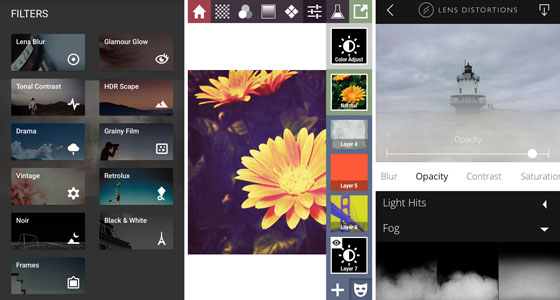
If you ask any group of iPhone photographers for a list of their top five go-to photo editing apps, I would wager that most of them would include Snapseed [1] in their list.

Snapseed is one of the most popular photo editing apps for the iPhone, and for good reason. It’s incredibly easy to use, but at the same time it offers a powerful collection of tools that can take your photos from “okay†to “wow!â€
Recently, Google (the developer behind Snapseed) released the long-awaited version 2.0. With this update came many improvements to an already excellent app.
Snapseed excels in all basic photo processing techniques. It also includes a number of fun filters and textures (the ever-popular Grunge filter is a long-time favorite of many).
If you’re new to iPhone photography, this really should be one of the first apps you download and learn.
Snapseed is available for FREE from the App Store. [2]
Learn how to use Snapseed with our in-depth tutorials:
How To Use Snapseed’s Essential iPhone Photo Editing Tools
How To Use Snapseed’s Advanced Photo Editing Tools
2. VSCO Cam
Another very popular editing app is VSCO Cam [3] . While this app also functions as a camera app, it’s the rich collection of filters and editing tools that makes it known primarily as a photo editing app.
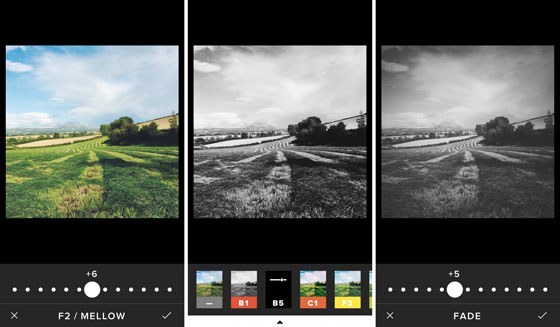
VSCO (Visual Supply Company) have built their reputation in the photo world by creating unique film emulation presets that can be used with the desktop software Adobe Lightroom. Luckily for mobile photographers, they’ve packed much of that editing power into this fantastic app.
Unlike other apps where the filters can be a little harsh, VSCO Cam’s filters are generally designed to emulate classic and modern analog films.
Many of the filters feature a soft, slightly faded look that has quickly become very popular amongst mobile photographers. The strength of every filter can be adjusted to suit your taste, and the app also features a number of highly-effective editing tools.
VSCO Cam is FREE on the App Store [4] Â and comes with a basic collection of filters to get you started. You can then download additional bundles of filters from within the app if you wish. Some can be downloaded for free but others have to be purchased (between $0.99 and $5.99 per bundle).
Learn how to use this app with our in-depth tutorial on VSCO Cam photo editing.
3. Filterstorm Neue
I’m a huge fan of Filterstorm Neue [5] . It offers many of the features and editing control of more powerful desktop applications like Lightroom and Photoshop, but in a mobile-friendly format.
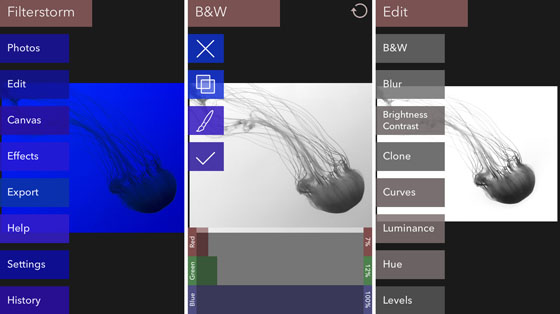
If you’re interested in learning more advanced editing techniques and taking your photography to another level, it’s worth investing some time in learning how to use this app.
In addition to all of the typical photo editing tools, Filterstorm Neue includes one of the best mobile implementations of a powerful Curves control for fine-tuning brightness and contrast.
It takes a bit of time to learn how to use a Curves tool effectively, but once you do, you may never want to use adjustment sliders again. Many other apps have started adding variations on the Curves tool, but most of them are more limited in how it can be used.
One additional feature that really sets Filterstorm Neue apart from the rest is that you can selectively apply adjustments through a number of tools, including a powerful masking brush as well as radial and linear gradient filters.
If you’re looking to move beyond basic photo editing with your iPhone, Filterstorm Neue is the next logical step.
Filterstorm Neue is available for $3.99 on the App Store. [6]
4. AfterFocus
AfterFocus [7] is more of a specialty app in that it really only does one key thing, but it does it very well. This app allows you to imitate the shallow depth of field effect that can typically only be achieved with a DSLR.
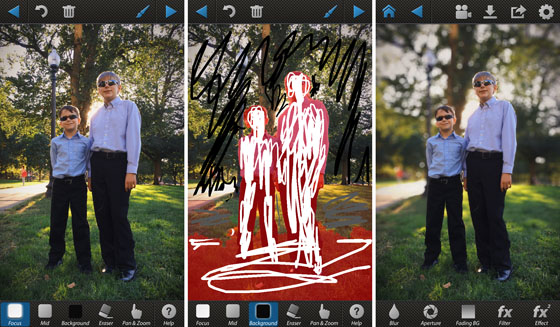
Shallow depth of field is when only your main subject is in focus and the background appears blurred. AfterFocus provides a very user-friendly way of achieving this effect.
You simply mark your image as to where the foreground and background are. You can even add a natural-looking bokeh effect where the background highlights are rendered as soft circles/hexagons.
This app can be especially useful for drawing the viewer’s attention to your main subject if the background is a bit busy and distracting.
AfterFocus is available for $0.99 on the App Store. [8]
5. TouchRetouch
Many apps now offer the ability to remove unwanted elements from a photo, but TouchRetouch [9] Â is still one of the easiest and most effective.
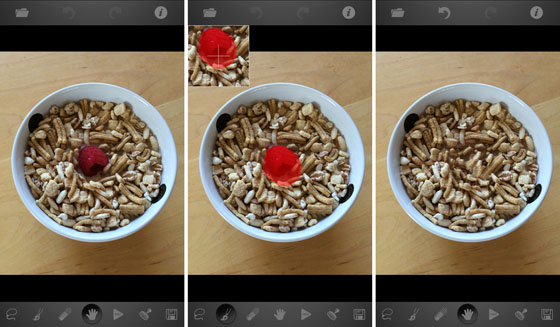
Using your finger, you can quickly and easily highlight the objects (or parts of objects) that you want to remove (shown in red). When you tap “Start†the app removes the unwanted objects and replaces them with pixels from the surrounding area.
Removing more complicated elements may take a few tries to get it perfect, but TouchRetouch makes it easy to start over if you’re not happy with the results.
TouchRetouch is available for $1.99 on the App Store. [10]
Learn how to remove unwanted objects from your iPhone photos with our in-depth tutorial on TouchRetouch.
6. Enlight
Enlight [11] is a fairly new app, but it’s quickly become a favorite of many iPhone photographers. While no app can truly claim to do it all, Enlight comes very close with its extensive collection of basic and advanced editing tools.
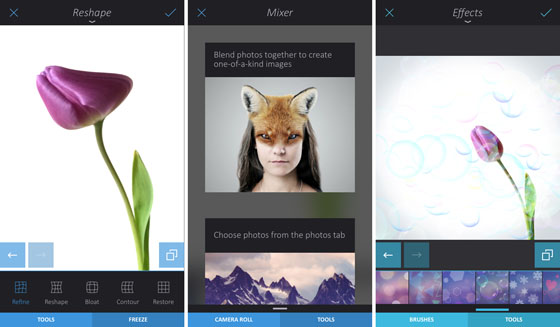
It also includes a number of more whimsical and artistic effects, so that you can really get creative and have some fun with your images.
With so many features, this app can take a bit of time to fully understand, but each tool is very intuitive in how it works. Additionally, Enlight has one of the best built-in Help features available in any app.
The first time you access any tool, a quick visual animation or guide appears on the screen to show you exactly how to use that tool. These “tool tips†can be accessed at any time thereafter by simply swiping down from the top of the screen.
Enlight is available for $3.99 from the App Store. [12]
Learn how to use Enlight with our in-depth tutorials:
How To Use Enlight App For Powerful iPhone Photo Editing
How To Create Unique iPhone Digital Art With Enlight App
7. Stackables
Sooner or later you’ll want to experiment with layering textures and other effects over your iPhone photos. While there are many worthy apps for doing this, the one that’s often mentioned first by many top mobile artists is Stackables [13] .

Not only does this app offer a wide range of textures, but each of them is adjustable and you can combine as many as you want through an easy-to-use layering approach (very similar to more powerful software such as Photoshop, but without the high cost and long learning curve).
Stackables does take a bit of time to learn how to take full advantage of its features, but you can get started in no time by using any of the preset “formulas.†You can even open the pre-existing formulas to see how they’re crafted, which can help you learn how to make your own and save them for future use.
Stackables is available for $1.99 on the App Store. [14]
8. SKRWT
One drawback of having a fixed wide-angle lens on the iPhone is that it often results in somewhat “distorted†images where the image look bent or stretched.
This is a common issue with all manner of wide angle lenses and is most noticeable with architectural photos and other images that feature strong lines where the “curving†effect is most pronounced.

With SKRWT [15] , you can quickly and easily correct these distortions. This helps ensure that your final image more closely resembles how the scene looked to your naked eye. You could of course take a “normal†image and distort it in SKRWT for dramatic effect.
There are other apps that offer this type of functionality, including Snapseed and Enlight, but SKRWT is solely focused on this type of editing and is still one of the better options.
SKRWT is available for $1.99 on the App Store. [16]
Learn how to correct perspective in your iPhone photos with our in-depth tutorial on SKRWT.
9. Superimpose
If you want to get more creative and start compositing multiple images into a single photo, one of the best options is Superimpose [17] .
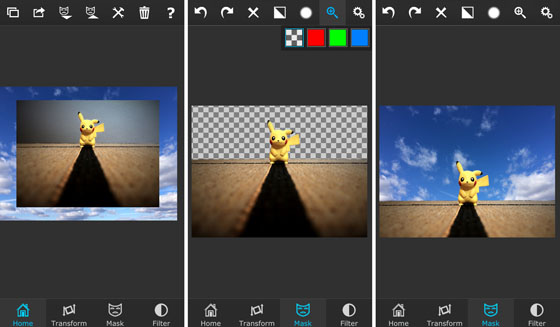
If you’re not already familiar with masking and layering images, this app does require a bit of experimentation to learn, but it really isn’t that hard and can be learned in less than 30 minutes.
You can use Superimpose for a wide range of compositing effects, from simply removing an unwanted background from your image to creating truly unique compositions. With this app, you’re only limited by your imagination!
Superimpose is available for $0.99 on the App Store. [18]
10. Lens Distortions
Finally, there are many apps on the market these days that allow you to add lighting effects and textures to your iPhone photos. One of the latest to offer these features is Lens Distortions [19] , and it’s quickly earned a place on many iPhone photographers’ list of go-to apps.
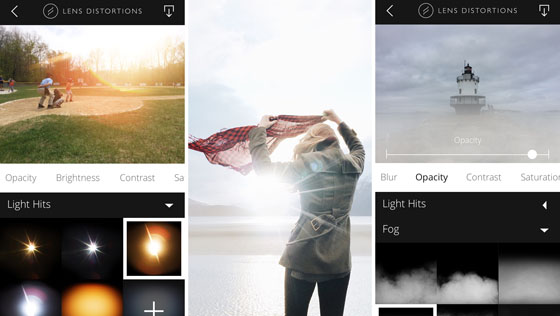
What really sets Lens Distortions apart from other similar apps is that all of the filters are created from actual photos of those same elements.
All of the effects are derived from optically-captured elements, including actual sunlight (Light Hits collection), haze (Fog collection), fragments of glass (Legacy collection), as well as a unique “Shimmer†collection.
Adding these images to your photos is remarkably easy and intuitive. I can spend hours just playing around in this app and seeing what sort of new creations I can come up with.
Lens Distortions is available for FREE from the App Store [20] , but it only comes with a basic collection of effects. Additional effects are available as in-app purchases, and they’re definitely worth it.
Conclusion
Whether you’re brand new to iPhone photography or simply looking for a new app to add to your “camera bag,†hopefully this list has give you some inspiration for new apps to try out.
The key to successful photo editing is to just use a handful of the best apps, and learn to use them to their full potential. That way you can quickly and easily enhance your iPhone photos using the best tools available for the job.
Happy editing!
If you also want to take great photos with your iPhone, please join 21,574 subscribers who receive our free iPhone photography email tips [21] that you won’t find anywhere on this blog.
4
JUL
Links
- ^ Snapseed (itunes.apple.com)
- ^ Snapseed is available for FREE from the App Store. (itunes.apple.com)
- ^ VSCO Cam (itunes.apple.com)
- ^ VSCO Cam is FREE on the App Store (itunes.apple.com)
- ^ Filterstorm Neue (itunes.apple.com)
- ^ Filterstorm Neue is available for $3.99 on the App Store. (itunes.apple.com)
- ^ AfterFocus (itunes.apple.com)
- ^ AfterFocus is available for $0.99 on the App Store. (itunes.apple.com)
- ^ TouchRetouch (itunes.apple.com)
- ^ TouchRetouch is available for $1.99 on the App Store. (itunes.apple.com)
- ^ Enlight (itunes.apple.com)
- ^ Enlight is available for $3.99 from the App Store. (itunes.apple.com)
- ^ Stackables (itunes.apple.com)
- ^ Stackables is available for $1.99 on the App Store. (itunes.apple.com)
- ^ SKRWT (itunes.apple.com)
- ^ SKRWT is available for $1.99 on the App Store. (itunes.apple.com)
- ^ Superimpose (itunes.apple.com)
- ^ Superimpose is available for $0.99 on the App Store. (itunes.apple.com)
- ^ Lens Distortions (itunes.apple.com)
- ^ Lens Distortions is available for FREE from the App Store (itunes.apple.com)
- ^ free iPhone photography email tips (my.leadpages.net)
No comments:
Post a Comment