
Ditch Australis completely or simply fine-tune it to your tastes.
When Mozilla unveiled its new Australis user interface in Firefox 29, it met with the usual Marmite response â€" some loved it, more hated it, and some even went as far as to claim they’ll stop using Firefox because of it.
We love the new look, but if you don’t agree â€" or you’d like to be able to tweak small parts of the UI â€" then you need this add-on. Its rather clunky name in full - Classic Theme Restore (Customized Australis) - covers all bases. You can use it to remove all traces of the Australis or simply tweak certain aspects of it.
Once installed, the add-on will immediately restore your browser to the pre-Australis look, which includes the Firefox button if you’re running Windows (although it does leave the new hamburger menu alone).
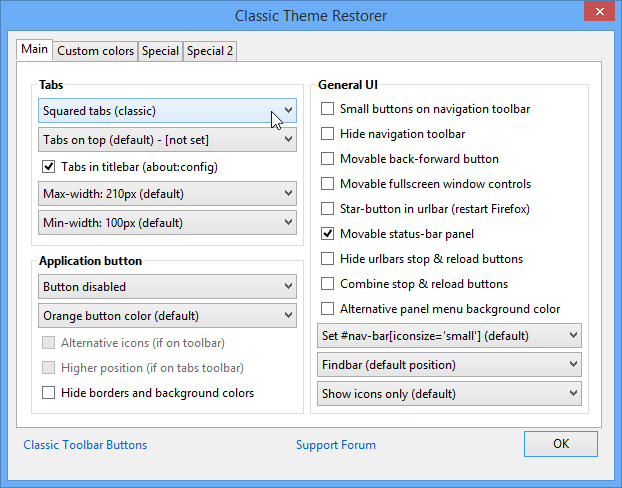
If that’s a step too far, open Firefox’s Options menu and select Classic Theme Restorer. You’ll see a host of options spread out over four tabs â€" use the Main tab to customise the tab look as well as the Firefox button on Windows machines. You’ll also get a number of general user-interface options here.
Custom colors allows you to change the colour scheme for tabs â€" both active/hover/default and unread/new. The two Special tabs offer additional options that go beyond simply tweaking aspects of the Australis user interface.
Most tweaks are applied instantly the moment you tick or select a box, and helpfully Firefox’s default choices are clearly marked in dropdown menus to make it easy to undo your changes.
The add-on is in a constant state of evolution, so further improvements and refinements will no doubt follow.
Related Download Articles
Â
Other Download Articles From This Category
Firefox Aurora 31.0a2
Open Source
Take a glimpse into the (relatively speaking) far future of the Firefox browser
No comments:
Post a Comment