

I live in China, where it’s essential to have a reliable VPN. During the last four years I’ve tried many VPNs. Today I’ll review VyprVPN [1] , which in my opinion is the best VPN for iPhone, iPad and Android devices.
What’s a VPN and why you may need it?
A Virtual Private Network â€" or VPN â€" allows you to send and receive data across the internet as if you were directly connected to a private network. But we don’t need to get overly technical. Here the main uses of a VPN:
- Bypass Internet censorship in China, Iran or other countries that restrict the access to a part of the web.
- Access to services that are only available in some countries. For example, if you want to watch your favorite TV shows on Netflix or Hulu but you aren’t in U.S., you can’t. Unless you use a VPN to access these websites from an American server!
- Create your own VPN and allow your employees to access your company’s private network even if they aren’t physically connected to it.
- Send sensible data (such as banking information) through an encrypted connection.
The best VPN for mobile devices
As I told you at the beginning of this article, I live in China, where the Great Firewall [2] blocks many websites such as Facebook, Twitter or Youtube. Thus, China is the perfect ground to test the reliability of a VPN.
In my experience only few VPN providers can pass this test: most of VPN either don’t work at all or are too slow and unstable in China.
Until today I found that VyprVPN [3] is the fastest and most reliable VPN for mobile devices in China (I’m using it on my Android smartphone and on my iPod Touch).
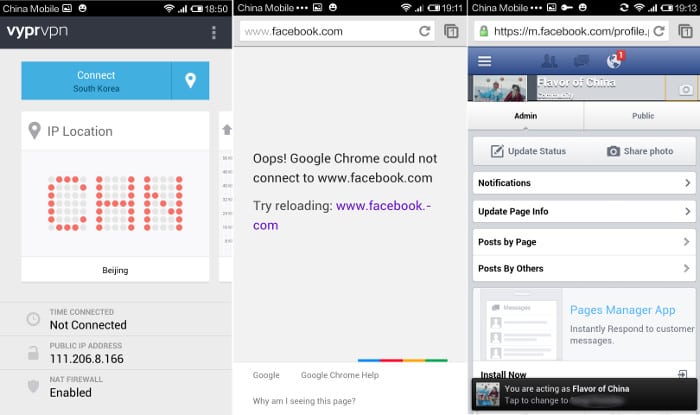 Using VyprVPN to access Facebook on my Android device: the “key†icon that appears on the top â€" next to the “smiling face†icon â€" indicates that my VPN is active
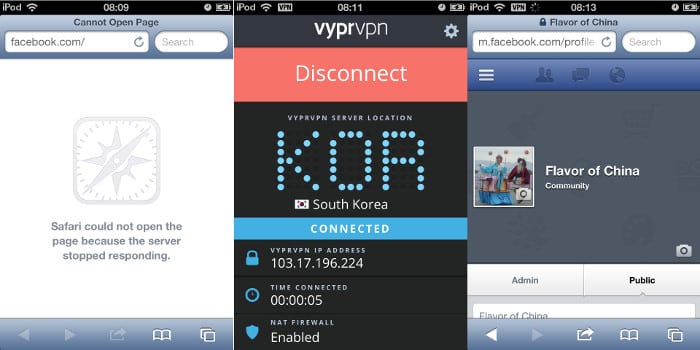 Using VyprVPN to access Facebook on my iPad touch: the “VPN†icon that appears on the top â€" next to wifi signal â€" indicates that my VPN is active
Why VyprVPN is the best VPN for Android, iPhone and other iOS devices
If you only consider reliability and stability, then there are other VPN that offer similar performances to VyprVPN [4] ( for instance StrongVPN, which we reviewed some months ago ). However, there are three additional features that make VyprVPN the ideal VPN for you smartphone or tablet. Here they are:
- VyprVPN Apps: Have you ever tried to set up a VPN account on your smartphone? I did it and it wasn’t a pleasant experience! It doesn’t matter if your phone runs Android or iOS, it’s always overly complicated. You’ll have to introduce long codes and passwords and change them every time you want to adjust the setting of your VPN. In order to simplify this process, VyprVPN provides an app for both platforms (see below, it’s a screenshot took from my smartphone). You just have to download the app, log in and… that’s it! The app also allows you to set up the VPN connection wherever you are (for example in the case you want to switch server).
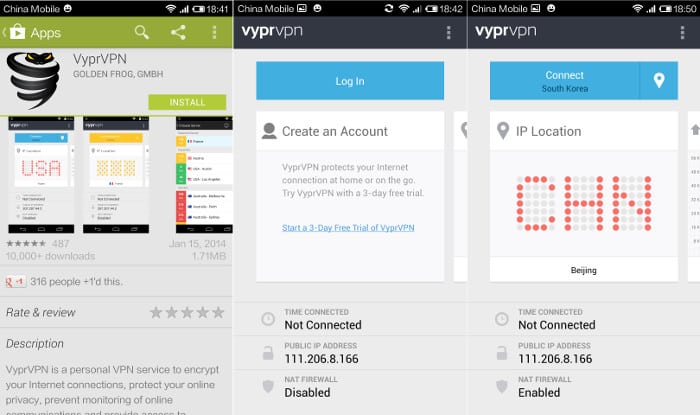
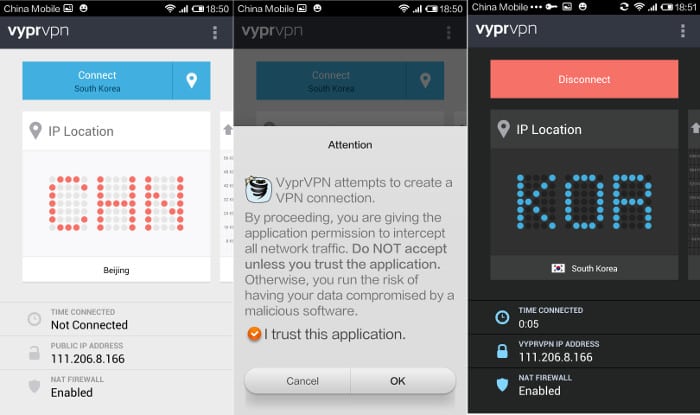 Installation of VyprVPN on my smartphone: As you can see it took me only two minutes to download the app, log in, set up my connection, select a server and activate my VPN.
- Simultaneous connections: The “pro package†allows you to have two simulations connections within the same account (you can have three with the “premium packageâ€). This is extremely useful because it means that you don’t have to disconnect the VPN from your laptop when you want to use it on your smartphone. Many other companies offer a discount if you want to purchase a second account. However buying and setting up another account isn’t practical at all.
- Protocols: Many VPN providers only offer one type of protocol for your Android or iOS device, normally the L2TP protocol. VyprVPN provides you the L2TP/IPsec, PPTP, OpenVPN and Chamaleon protocols. This may sound overly technical, but you don’t need to understand the details and the differences among the different protocols. The only thing you have to know is that the L2TP protocol sometimes just doesn’t work, especially in China. Thus it’s nice to have the possibility to switch to a different protocol.
How much it cost and which package should I choose?
VyprVPN [5] isn’t the cheapest VPN in the market. But, as usual, you get what you pay and I think that the features I’ve just shared with you are worth a couple of USD more.
The “basic package†costs 6.67 USD per month: you get one connection and the PPTP encryption protocol. Although this package may be enough for some people, I suggest you to go for the “pro package†(8.33 USD per month) as you get two simultaneous connections (for example your laptop and smartphone), all the encryption protocols I listed above and an extra layer of security, the NET Firewall (especially useful in wireless connections). If you need three simulations connections (for instance your laptop, your smartphone and your girlfriend’s iPad) you can go for the “premium package†(10 USD per month).
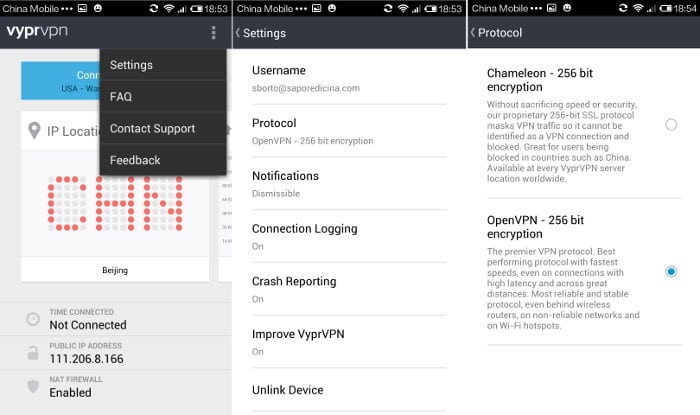 Setting my encryption protocol on my Android smartphone
Setting up your VPN
In this last section you can find some suggestions to get the most out of your VyprVPN.
First of all, use the protocol according to your needs. In order to select the most adequate protocol you can read the short explanation given by the software. For example, if your priority is the security of your connection you shall go for the OpenVPN protocol. Conversely, if you don’t mind to lose a bit of security in order to gain speed you may prefer the PPTP protocol.
In order to set the protocol go to the tools menu of your VyprVPN app (the gear icon on Apple devices or the three dots icon on Android devices )â€"> click on settings â€"> click on Protocol and select your protocol (see caption above).
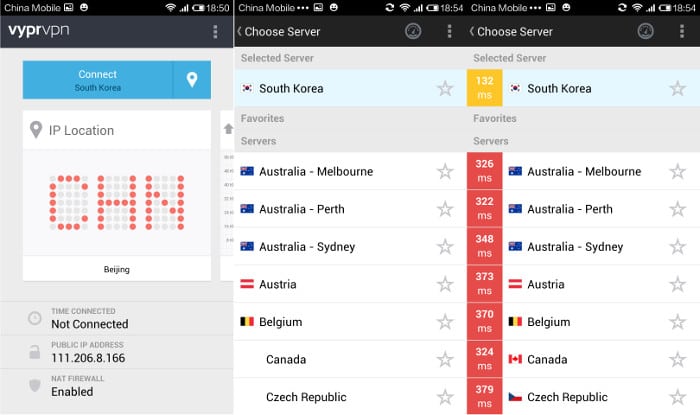 Checking the ping time and selecting the best server: Since I’m in China the best servers for me are the ones located in Japan, HongKong and South Korea, so I selected the one in South Korea
Check the ping time (that is the delay time between your device and the server) and choose the best server for you. You can do this by clicking on the “location†icon (next to the server location), then on the speedometer icon (check caption), and selecting the server that returns the smallest time (indicated in milliseconds, ms) as a smaller ping time corresponds a faster connection.
That’s all for today. If you have any questions or suggestions just post a comment below.
Sign up to get our free e-books ; )
Sign up to get the "Find a Job and Live in China e-Book" and the "Chinese/English Travel Phrasebook." Your email address will never be shared.
Enjoy this post? Please share a bit of love...
Links
- ^ VyprVPN (www.goldenfrog.com)
- ^ Great Firewall (en.wikipedia.org)
- ^ VyprVPN (www.goldenfrog.com)< /li>
- ^ VyprVPN (www.goldenfrog.com)
- ^ VyprVPN (www.goldenfrog.com)
- ^ Click here to try VyprVPN for free! (www.goldenfrog.com)
No comments:
Post a Comment