
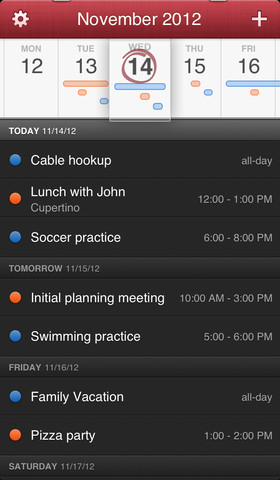
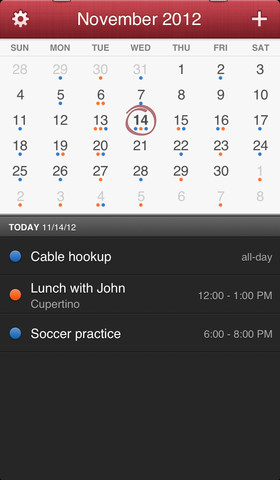
As promised , Flexibits today launched Fantastical for the iPhone. The app makes a leap from the Mac, where it’s been deemed the most popular calendar software for the platform. And one of its trademark features â€" the natural-language engine which parses entries, allowing one to just type in full sentences to create events â€" is now available on the iPhone and is just as effective as on the Mac. And for those that don’t like to type, Fantastical also supports dictation so you can speak the details for your event…
Of course, the system-wide Dictation feature requires an iPhone 4S/5 or the fifth-gen iPod touch and Internet access. One of the new features in the iPhone version of Fantastical is the DayTicker view of the next few days of events at a glance.
“With its powerful natural language event creation, DayTicker, calendar, and event list, Fantastical is the fastest and friendliest calendar you’ll ever useâ€, Flexibits boasts.
It’s also the prettiest calendar app as well.
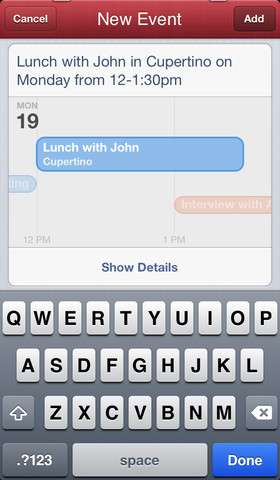
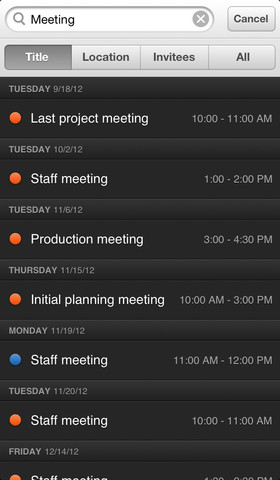
Fantastical for iPhone is heavy on gestures.
For example, just pull down slightly to reveal a search box to find a desired calendar entry. But if you drag down a little more, a handy month view is revealed.
Even at first glance, it’s evident that a lot of care and thought went into creating this app and I can’t wait to see Flexibits do its magic on the iPad (so far, Fantastical doesn’t support Apple’s tablet natively).
Here, release notes:
ADDING NEW EVENTS IS FUN
• The easiest and fastest way to add new events
• Just type in your event details or use dictation* and watch your words magically turn into an actual event!
THE FUTURE LOOKS BRIGHT
• Fantastical’s DayTicker is the efficient and enjoyable way to see your schedule
• The expansive and beautiful event list makes it easy to find your events
• Tap an event to show and edit its details
• Use search to instantly locate specific events
• View and manage your Facebook events (requires iOS 6)
THE ULTIMATE LANGUAGE SUPPORT
• Fantastical is fully localized in English, French, German, Italian, and Spanish
• Just type or speak* your event in any of these languages and Fantastical will automatically understand
Right below is the Fantastical event entry on the Mac, via the menu bar icon.
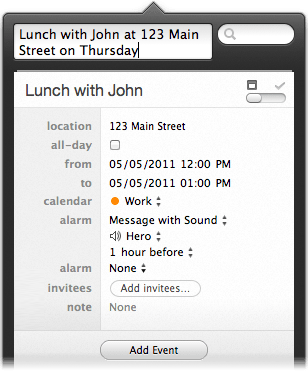
Fantastical for Mac
For those who want to learn more, The Verge [1] and MacStories [2] have nice reviews up.
The Verge’s verdict:
Yes, Fantastical doesn’t include the full-screen “Week View†loved by many, and featured in the iOS Calendar (in landscape mode) and other apps like Week Calendar, but I’d still recommend the app to those people.
At $1.99, the ability to quickly create events is easily worth the price of admission.
MacStories summed up in their review:
When my doctor asks me about my schedule, I can just fire up Fantastical and have an instant overview of my week.
If I need to quickly add an event, I can dictate it or, even better, ask my girlfriend to add it if I’m driving. She won’t have to learn a complex interface or carefully select menus and dropdowns.
By the way, our friend and MacStories editor Federico Viticci is rightfully angry that other publications broke the review embargo.
Concluding that Fantastical is his favorite new iPhone app, he wrote:
Fantastical for iPhone gets many things right without cluttering the interface or forcing me to learn a new set of rules and menus.
Like Tweetbot’s tap & hold actions, Instapaper’s footnotes, or Launch Center’s presentation of shortcuts, Fantastical’s DayTicker and natural language support made me ask myself: Why hasn’t anyone else done this before?
If you’re interested in taking the plunge, Fantastical is now available at an introductory, limited-time 50 percent discount and costs two bucks a pop. [3]  The Mac version is a $10 value [4]  thanks to the launch discount, but it normally costs twice as much.
Does Fantastical look like the perfect calendar app for the iPhone?
Links
- ^ The Verge (www.theverge.com)
- ^ MacStories (www.macstories.net)
- ^ two bucks a pop. (click.linksynergy.com)
- ^ $10 value (click.linksynergy.com)
No comments:
Post a Comment