
I’m constantly opening my iPhone’s Mail app to access my Gmail, and I’m not the only one: More than 350 million people currently use Gmail, with an increasing number of them accessing Google’s email service through their mobile phones.
But despite the fact that I have my phone set to “fetch†my Gmail every 15 minutes, I can’t seem to get it fast enough, and I find the search function on the iPhone’s Mail app leaves a lot to be desired.
So when a mobile version of an email app called Sparrow came to the iPhone a couple of weeks ago, I was hopeful that Sparrow would offer me a better mobile email experience.
Over the past week, I’ve been testing Sparrow on my iPhone, comparing it to other email apps, and I found that while Sparrow doesn’t solve every email problem, it does bring a new design and some new features to email on the iPhone. Gmail’s own app, meanwhile, was much better for searching through old emails than any other app I tested.
Sparrow costs $2.99, and is available for download through the App Store. It works with every type of email â€" including Gmail, Yahoo, AOL, and iCloud â€" except for secure Microsoft Exchange email accounts and POP accounts. That stands for Post Office Protocol, and means you’re downloading new messages from a server onto your computer. Users can connect multiple email accounts to the Sparrow app.
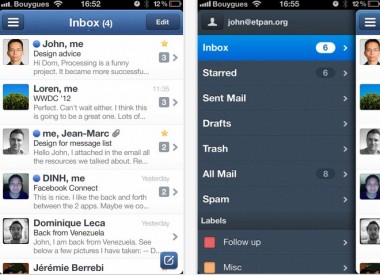
After downloading the app and accessing my Gmail account through it, I was prompted to link to my Facebook account, so that my Gmails would appear with the sender’s picture, provided that we were Facebook friends.
Right away, I noticed that the Sparrow app’s interface was easier on the eyes than the iPhone’s core Mail app. There are three main panes to the Sparrow app: The first pane lists your email accounts; the second lists Inbox, Sent Mail, Drafts, Trash, Spam, etc.; and the third pane is your Inbox. At the top of the Inbox is a navigation bar for quick scrolling through Unread and Favorite messages.
I thought Sparrow’s “threading†system made long email exchanges easier to read. If you’ve got an email with multiple exchanges, Sparrow doesn’t stack the exchanges and make you guess which one to tap in order to get to the email content you need. Instead, Sparrow lays all the text of the emails out for you. The core Mail app on iPhone offers both threaded and unthreaded emails, but unthreaded means you have a bunch of emails in your inbox rather than the conversation collapsed into one.
But Sparrow still doesn’t offer push notifications â€" immediate notifications that pop up on the interface of your phone when you’ve received a new email, even when you’re not in the app. Sparrow said this is because its iOS app initially wasn’t approved by Apple when it was built with push notifications, and Sparrow had to remove that function. (The iPhone’s Mail app does support push email, with iCloud, Gmail, Yahoo, Microsoft Hotmail, Microsoft Exchange and .Mac accounts.)
And in my experience, new email data took longer to load through the Sparrow app than it did through the core iPhone Mail app.
The best part of Sparrow, in my opinion, is the ability it offers to easily send mobile photos via email. A little paper-clip icon in Sparrow email drafts brings you directly to your photo library or allows you to take a picture. If you’ve ever drafted an email and then tried to attach a photo, only to realize you would have to go into the Photo app to do that, you might appreciate this feature as much as I did. The Gmail app does this, as well.
Google’s own Gmail app for iOS hit the App Store in mid-November. It doesn’t allow users to sign in with multiple email accounts, which is one of the main reasons why I won’t continue using it.
It does, however, offer badge notifications â€" the numbers that appear in the corner of your app icon to let you know when there’s a new email. It also has sound notifications, so a chime would push through my phone when I got a new email. Google says it’s also planning to bring banner notifications to the app.
But, as one might expect from a Google product, I found that the best part of the Gmail app for iPhone was its search function.
To test this out on all of the apps, I searched for emails from my mom, and used her first name, Rose, which is a part of her email address. First, I searched through iPhone’s Mail app. Immediately, a recent email from my mom appeared at the top of the results, but then I had to continue searching through the email server for more messages. A few seconds later, an email from 2007 popped up, and then an email from 2008, and so on. It took several seconds before the email threads between us appeared in the right order, from the most recent to the oldest messages.
Next I tried searching on Sparrow. The search function in Sparrow isn’t immediately visible; I had to “pull down†my emails to see the Search bar. As with the core iPhone email app, a very recent note from my mom appeared, but then I had to continue searching through emails on the server. About eight seconds later, other email results began to pop up.
Next, I searched for her name in the Gmail app. Within two seconds, all the emails from my mom appeared, from most recent to earliest. However, unlike the core email app, the Gmail app doesn’t offer the ability to filter searches using From, To or All. So some of the emails that came up in results weren’t actually from my mom â€" they just mentioned her name, or the word “rose.â€
After a week of testing email apps, with varying levels of notifications, my phone became a veritable buzzing, beeping mess of alerts that would pop up, offer little information and still force me to go into different email apps to access the email. So the moral of this story is that too many apps will negate the entire purpose of email apps, which is to make your email life easier and more efficient.
Overall, I liked Sparrow’s design, user interface, the option to link multiple accounts, and the ability to send photos in emails. Force of habit kept me going back to the regular Mail app on my iPhone, but I plan to continue using Sparrow for my day-to-day email. If you’re a Gmail user and you find yourself frustrated with the iPhone’s email search, the free Gmail app will offer you a better option for search, but you won’t be able to link to multiple email accounts and see your messages in a unified inbox.
(Carousel image courtesy of Flickr Creative Commons/Thib Audd [1] )
No comments:
Post a Comment